

Contrast analysis is one of the most useful and most tedious jobs in SEO. Open the top results, write down what competitors cover, compare it with your own page, and repeat for every query. I handed that work to a router agent in Orakul and ran it on a real store — anastasiya.studio, which sells printable music worksheets for kids. Below is the data: what the agent found, where its export needed a second look, what I changed on the site right away, and how I'll check the result.
What contrast analysis is
It answers one question: what is my page missing compared with the pages already in the top results for this query? Not "write 2,000 words" and not a generic checklist, but specific subtopics that most competitors cover and you don't. If a subtopic shows up on 4 pages out of 6, that's a signal. If it shows up on one, it's probably just that site's quirk.
Step 1. Where to look: clicks, but positions 10–20
The first request to the agent is a 30-day Google Search Console export: pages that got clicks but sit on page two of the results. Clicks confirm there is demand, and page one isn't far away.
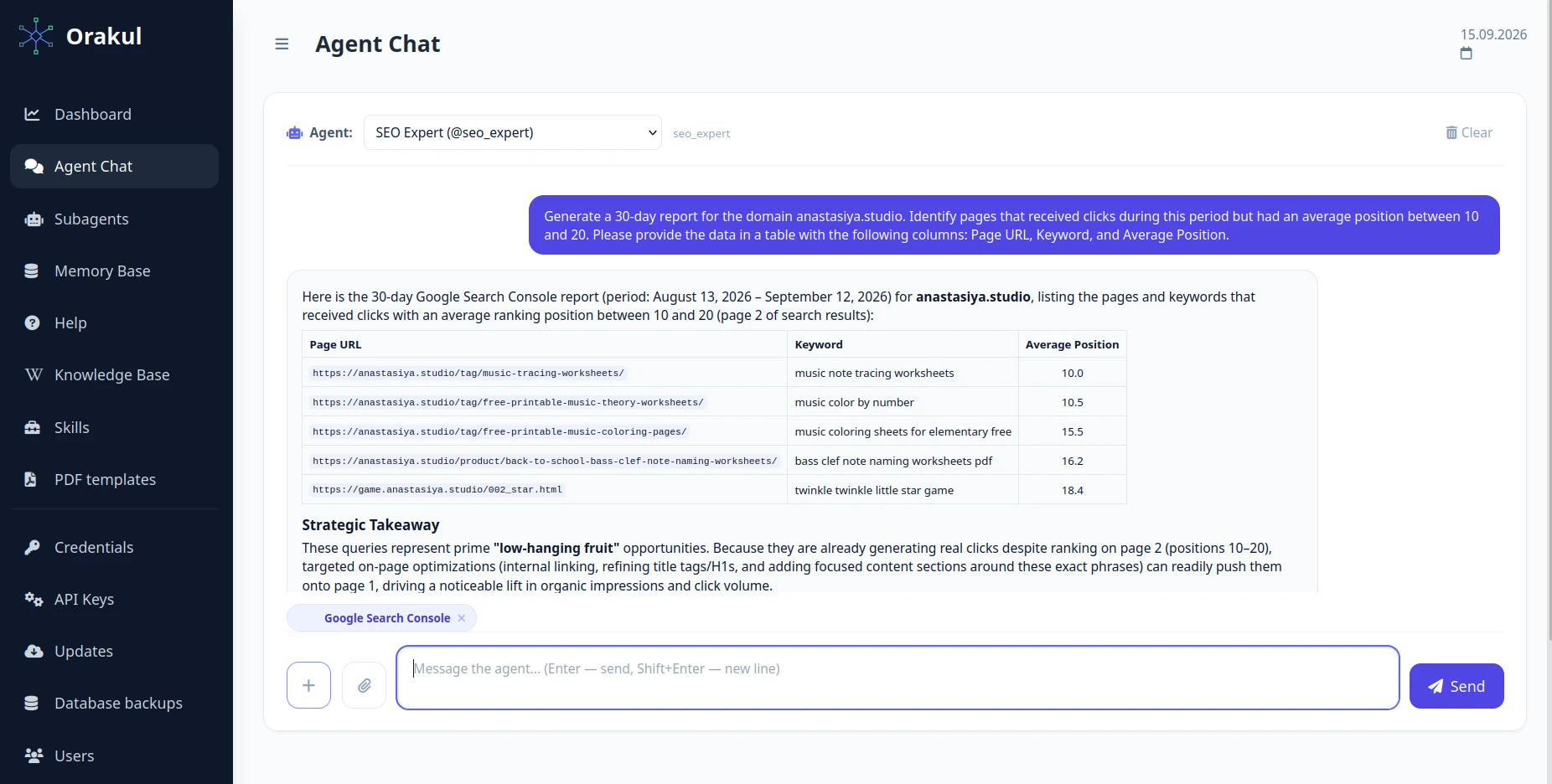
| Page | Query | Average position |
|---|---|---|
| /tag/music-tracing-worksheets/ | music note tracing worksheets | 10.0 |
| /tag/free-printable-music-theory-worksheets/ | music color by number | 10.5 |
| /tag/free-printable-music-coloring-pages/ | music coloring sheets for elementary free | 15.5 |
| /product/back-to-school-bass-clef-note-naming-worksheets/ | bass clef note naming worksheets pdf | 16.2 |
| game.anastasiya.studio/002_star.html | twinkle twinkle little star game | 18.4 |
A manual check: the number matches, but it rests on 2 impressions
An export shouldn't be taken on faith, so I checked one pair in the Search Console interface, filtering by both query and page.
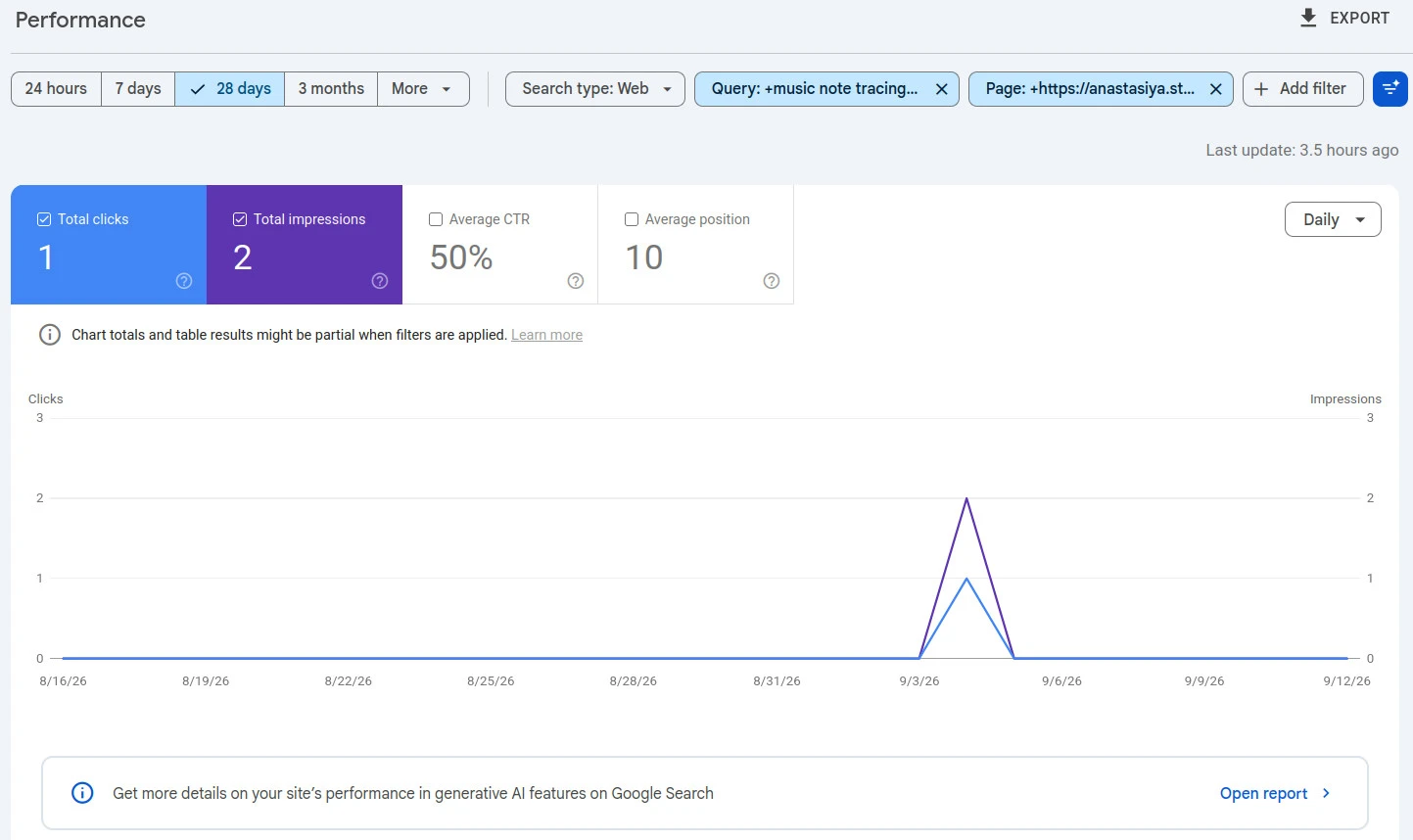
The position matched: 10 in GSC, 10.0 from the agent. But behind it are 2 impressions and 1 click on a single day, September 4. That's not a ranking, it's a fluke. A "has clicks + position 10–20" filter with no impression floor lets pairs like this through, so the request to the agent should include a minimum number of impressions.
The other rows can't be checked the same way: the GSC interface won't build a page + query table across several URLs at once. For those, you have to trust the export the agent pulls from the connected Search Console.
Step 2. How the agent compares a page with the top results
The second request goes page by page: "analyze the page for query X and determine what it needs to reach the top." The agent takes Google's first page of results, opens the competitors, extracts subtopics, counts how many pages cover each one, and checks whether ours does. Each subtopic becomes one line. For example, for "music color by number":
Add explicit age groups and grade levels (Preschool, Pre-K, Kindergarten, Grade 1) to the page copy and product data. Found on 4 out of 6 competitors. On our page: weak — ages are mentioned only in navigation and product titles.
Besides the list of edits, the report has a "what's already good" section and demand context. All of it is in the public document covering all five pages.
Two caveats the agent states in the report itself. First, the samples are incomplete: it managed to open 4 pages out of 8, 6 of 9, 6 of 9, and 3 of 9. Pinterest, Scribd, and direct PDF files don't return HTML, so there's nothing to compare. Second, it found no demand data for the exact long-tail queries. Wordstat shows zero for an English-speaking audience, and Bing only reports the broader topic: "music coloring pages," for example, had 141 impressions over 4 weeks.
What the five queries showed
1. "music note tracing worksheets," position 10.0 — a ceiling of 1–2 positions
The top results belong to big players. Content work might move the page up 1–2 positions, no more. The agent still found gaps: grade levels and ages (3 of 4 competitors), sequential note reading from Middle C (3 of 4), and instrument-specific sections (2 of 4).
2–3. "music color by number" (10.5) and "music coloring sheets for elementary free" (15.5) — worth working on
Here the report gives a clear list. For color by number:
- worksheet and page count on the product card — 4 of 6;
- an explanation of the mechanics and color key ("1 = red, 2 = purple") — 4 of 6;
- ages and grade levels — 4 of 6;
- file format (PDF) and how to download it — 4 of 6;
- skill benefits in visible copy: number recognition, fine motor skills — 3 of 6.
For the coloring pages, the main gaps are character-driven themes (5 of 6) and the total number of sheets available (3 of 6).
4. "bass clef note naming worksheets pdf," position 16.2 — the agent refused to suggest edits
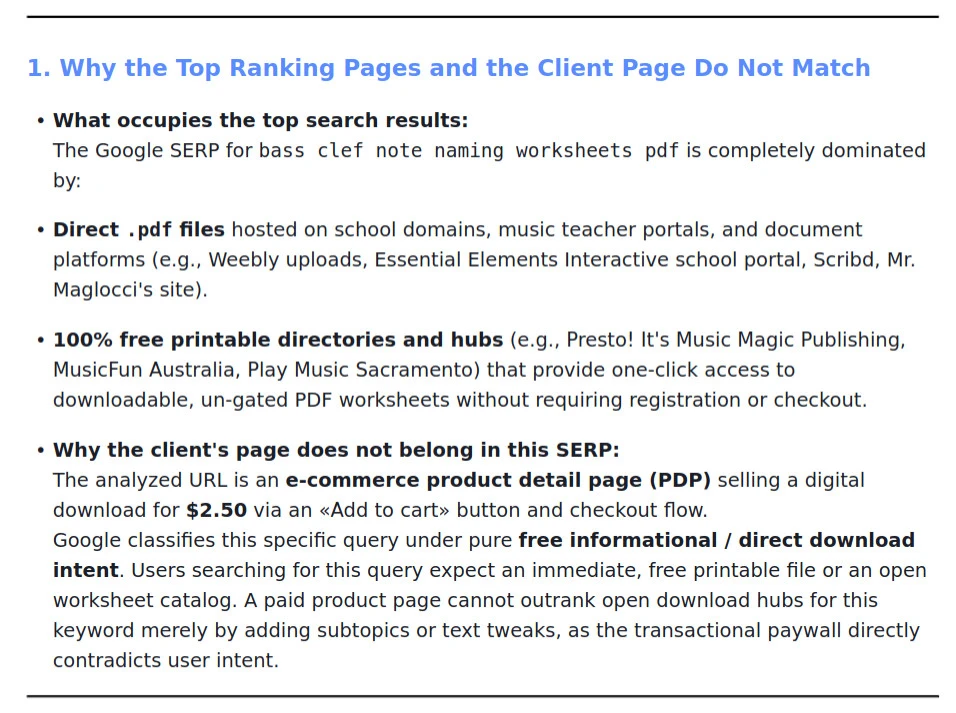
This is the most useful result of the whole run. The results are direct PDF files from school sites and free directories where the file downloads in one click. Our page is a $2.50 product with a cart. The searcher wants a free file, and added subtopics won't change that. On top of that, only 3 of the 9 results returned HTML, which is too few for a reliable comparison.
The agent offered two paths: retarget the product page to commercial queries (for example, "printable bass clef music theory worksheets for kids"), or build a separate free page with 1–2 PDFs that links to the full paid 10-worksheet pack.
5. "twinkle twinkle little star game," position 18.4 — nothing to compare
This is a game page with no text content. Contrast analysis doesn't apply.
What I changed right away
- "A4 PDF" and "Instant Download" badges on every product. 4 of 6 competitors state the file format and instant download explicitly. Our product cards didn't.
- A "grade level" field in the admin. Anastasiya is filling it in for the top products. 3 of 4 and 4 of 6 competitors state ages and grades.
- Free products now hand over the file immediately.
- A reminder in one month to check the average position for these pages.
I deliberately left the snippets alone. Snippets move CTR, content moves position. Change both at once, and a month from now there's no telling which one worked.
What's in the report but not done yet
- Sheet count per pack on the product cards (4 of 6 competitors).
- A block explaining how color by number works, with the color key (4 of 6).
- Skill benefits in the visible page copy. Right now they're only in the meta description (3 of 6).
Seasonality: why the analysis runs every two weeks
The store is highly seasonal: back-to-school, Halloween, Christmas, Easter. In two weeks people will be searching for Halloween coloring pages, and a fresh export will surface different pages. So there are two cycles. A new export and analysis every two weeks, for pages that have just reached positions 10–20. A check after one month, for what has already been fixed.
That leads to a practical takeaway. Changes take weeks to show up in the results, so seasonal pages are better analyzed before the season, using last year's data, rather than waiting for them to surface on page two.
How I'll check the result
In a month, mid-October, I'll compare average positions. I'll look at each page as a whole, not at page + query pairs: with two impressions, any change is meaningless. And not at clicks: by October back-to-school demand will have faded, and clicks will drop no matter what I changed. I'll publish the result as an update to this article, even if it's zero.
What to take away
- Pick pages with clicks at positions 10–20, but set an impression floor.
- Check at least one row of the export by hand in GSC.
- Count frequency: a subtopic most of the top covers is a must; one covered by 1–2 sites is optional.
- Check intent first. A paid product page doesn't belong in a SERP full of free PDFs, and no amount of copy fixes that.
- Change one lever at a time, or you won't know what worked.
- With seasonal demand, repeat the analysis on a schedule, not once.
The agent behind this analysis runs in Orakul. The full report on all five pages is in the public document.

0 comments
No comments yet — be the first to share your thoughts.
Sign in to post your comment instantly:
…or comment as a guest — guest comments appear after moderation.